
LCC Unreal Plugin Introduction





LCC Unreal Plugin (LCC4Unreal) is a 3D Gaussian Splatting (3DGS) rendering plugin developed by XGRIDS on Unreal Engine 5. It imports, renders, and supports interaction with multiple 3DGS data formats inside UE5.
Supported Versions
| Version | Supported Engine |
|---|---|
| v1.0.0 and above | Unreal Engine 5.4 ~ 5.8 |
| Below v1.0.0 | Unreal Engine 5.1 ~ 5.7 |
Supported platforms:
- Development on Windows: packages Win64, and cross-compiles to Linux x86
- Development on native Linux: packages Linux x86
Note: released plugin packages are built against engines published by Epic, including the prebuilt version installed through the Epic Games Launcher and source builds compiled from unmodified official source. Vendor-customized branches (such as the NVIDIA RTX branch) and engines with locally modified source cannot use the official plugin packages directly and require a custom build. See Custom Engine Versions.
Supported Formats
| Format | Extension | Description |
|---|---|---|
| LCC2 | .lcc2 | XGRIDS proprietary format and the current primary format. Supports depth, LOD, and an octree structure |
| LCC | .lcc | XGRIDS proprietary format, superseded by LCC2 |
| SOG | .sog | Introduced by PlayCanvas. Uses the LCC2 pipeline, supports depth, no LOD |
| SPZ | .spz | Introduced by Niantic Labs, compatible with v2/v3/v4. Uses the LCC2 pipeline, supports depth, no LOD |
| PLY | .ply | Standard 3DGS format. Point cloud PLY files without Gaussian attributes can also be loaded. Uses the LCC2 pipeline, supports depth, no LOD |
Two Rendering Pipelines
The plugin ships two rendering implementations, referred to as the LCC pipeline and the LCC2 pipeline. The format determines which pipeline the data goes through:
| Pipeline | Formats | Characteristics |
|---|---|---|
| LCC2 | .lcc2 / .sog / .spz / .ply | Current primary pipeline. Outputs depth and participates in occlusion tests; all visible data is merged into a single buffer and submitted in one draw call |
| LCC | .lcc | Earlier implementation, used only for loading .lcc data. Does not output depth, and submits one draw call per node |
Feature coverage differs between the two pipelines: some parameters are available on only one pipeline and are hidden in the Details panel of the other. Each document marks the pipeline a parameter belongs to.
Corresponding Actors
| Actor | Pipeline | Purpose |
|---|---|---|
| ALCC2Actor | LCC2 | Loads the .lcc2 format |
| ALCCActor | LCC | Loads the .lcc format |
| ASogActor | LCC2 | Loads a single .sog file |
| ASpzActor | LCC2 | Loads a single .spz file |
| APlyActor | LCC2 | Loads a single .ply file |
Getting the Plugin
Plugin Directory Structure

LCC4Unreal plugin directory structure
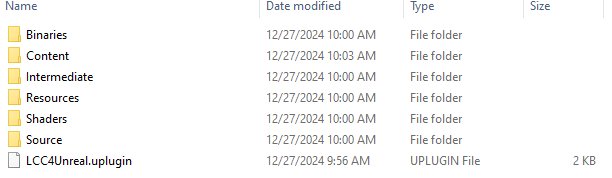
LCC4Unreal plugin files and subdirectories
| Directory / File | Description |
|---|---|
| Binaries | Binary libraries |
| Content | Plugin assets (materials and others) |
| Intermediate | Build intermediates (UHT-generated headers and code, do not delete) |
| Resources | Icon assets |
| Shaders | Rendering shaders |
| Source | Module source definitions |
| LCC4Unreal.uplugin | Plugin descriptor file |
Coordinate System
LCC data uses a Z-up right-handed coordinate system and UE uses a Z-up left-handed system. No extra handling is normally required.
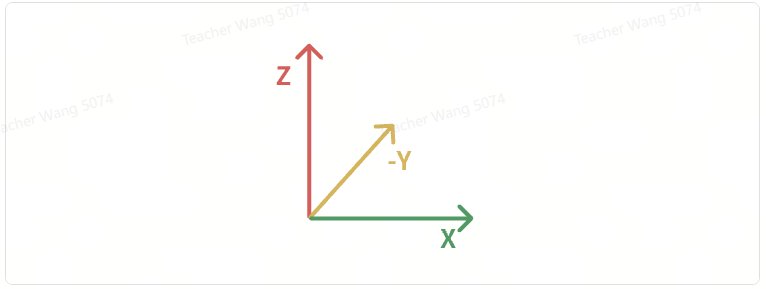
LCC and Unreal Engine coordinate systems compared
For Y-up PLY files, rotate the Actor 90 degrees around the X axis.
Feature Overview
- Multi-format 3DGS rendering (LCC/LCC2/PLY/SOG/SPZ)
- Point cloud PLY loading
- Dual rendering modes: 3DGS and point cloud
- Tiled rasterization, which can raise rendering performance depending on the scene (Pro edition)
- Perspective and orthographic projection
- 3DGS display in the Path Tracer view (no lighting compositing, not part of the path tracing pipeline)
- Adjustable spherical harmonics order (1st to 3rd, or off entirely)
- Point cloud data coloring and elevation coloring
- Multiple normal generation modes (Fixed/ViewFacing/Hemispherical/ProxyMesh)
- Scene lighting interaction (Lit/Unlit)
- Color adjustment (saturation/contrast/gamma/offset/tint)
- Shadow receiving (experimental)
- Primitive Alpha Holdout (transparency mask) for keying and external compositing
- Clipping volumes and section planes (up to 65536 each, 50 each in the free edition), with clip collision regions supported
- Load volumes, filtering the data to load by region
- URL Data Loading, with no need to put data in the project (Pro edition)
- Dynamic collision data loading, with automatic collision mesh generation for single-file formats (Pro edition)
- LCC Actor physics simulation, for single objects such as chairs and boxes
- Query interfaces and event notifications for load, collision, and animation states, including Per-Camera Load State Query
- GIS geographic placement (Cesium integration)
- Loading animation
- nDisplay support
- VR stereo rendering
- DLSS support
- Navigation System support
- Single layer water support
- OpenColorIO color management
- Multi-camera / SceneCapture support, with per-camera render and load mode settings
- Full load rendering mode (automatic merge for small scenes)