
URL Data Loading: Load Models Directly from an http(s) Address
Models can be loaded directly from an http(s) address, without putting them in the project or packaging them into the game. This is a Pro edition feature. It applies only to the LCC2 pipeline (LCC2 / PLY / SPZ / SOG) and does not support LCC1 (.lcc) data.
Prerequisites
- The Pro license is activated, see Editions and Licensing.
- The device can reach the server that hosts the URL.
Without a license, the plugin sends no request to the server, the model does not load, OnLoadFailed returns NotLicensed, and the editor shows a notification: Loading models from a URL is a Pro feature. Activate a license to use it.
While the online license check has not finished, loading starts first. If the result is unlicensed, the model is discarded.
Supported Address Forms
Two kinds of URL are supported, as well as a ZIP archive that contains a single model.
| Form | Description | Example |
|---|---|---|
| Path-style URL | The path ends with a model extension (lcc2, ply, spz, sog), and the query string carries only extra information such as a token | https://cdn.example.com/site/meta.lcc2?token=xxx |
| Query-style URL | The path does not end with one of the extensions above, and the query string decides which file is downloaded. The plugin detects the file format from the leading bytes of the downloaded content | https://api.example.com/download?id=123 |
A ZIP archive must contain exactly one model, which the plugin extracts and loads. When it contains no model or more than one, InvalidData is returned.
Note: when loading
meta.lcc2, the plugin downloads the data files it references from the same directory by relative path, including the collision mesh, so these files must be placed under the same address directory.
Spaces, Chinese characters, and similar characters in the URL path are encoded as UTF-8 automatically, with no manual conversion needed.
Setup
Set in the Details Panel
- Place the matching Actor in the scene (
LCC2Actor,SPZActor, and so on). - Enter the URL in
Default Load Pathin the Details panel.
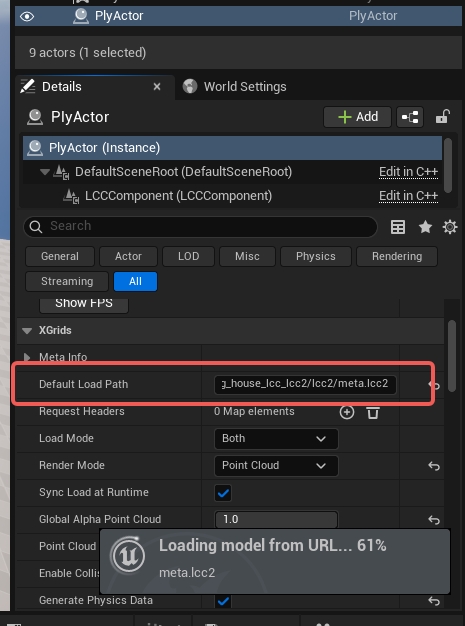
Enter the URL in Default Load Path
- When the server requires authentication, add request headers such as
AuthorizationinRequest Headers.
Note:
Request Headersis saved with the level and included in the packaged build. Do not enter secrets such as keys and tokens here; use the runtime approach below instead.
Set at Runtime
- Call
Set Request Headersand pass in the request headers. It replaces all existing request headers, takes effect for requests sent afterwards, and does not trigger a reload. - Call
Loadwith the URL asLCCPath.
Cache Behavior
Downloaded files are cached under the Saved directory of the project:
<project directory>/Saved/PersistentDownloadDir/LCC4Unreal/UrlCache
How the cache works:
- Revalidation: every load checks with the server whether the cache is up to date. When the server returns no update, the cache is used. When the server does not support revalidation, the plugin cancels the download and uses the cache if the content matches it.
- Network errors: an old cache is used when one exists, and a retry happens only when there is none.
- Disk space: free space is checked before downloading. When there is not enough space, nothing is downloaded (
OutOfDiskSpace), and an old cache is used if there is one. - Interruption protection: a download is first written to a
.parttemporary file and renamed only when complete, so an interrupted download is never treated as a complete file. - Automatic cleanup: once after each startup, files that have not been used for a while are removed in the background (the period matches the engine DDC). The cache has no size limit and needs no setup.
To clear the cache manually, call Clear Url Cache (category XGrids|Util) in Blueprints or C++, see ULCCUtilLibrary. Models already displayed are not affected.
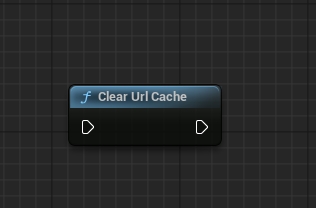
The Clear Url Cache Blueprint node
Load Failure Handling
When loading fails, OnLoadFailed fires; read Failure.Error to tell the cause. Failure.Path is the URL without the query string, so credentials are not written to the log. In the editor, one notification appears for each failed URL, and none appears when loading succeeds.
| Error | Meaning | Action |
|---|---|---|
FileNotFound | The server returned 404 / 410 | Check the URL |
InvalidData | The downloaded file cannot be read as a model, or the archive does not contain exactly one model | Check the file format and the archive contents |
NetworkError | Cannot connect, timeout, connection interrupted, or the server returned 5xx and similar errors; the parts already displayed are kept. An old cache is used when one exists, and a retry has already been made when there is none | Check the network |
AccessDenied | The server returned 401 / 403 | Check Request Headers or the credentials in the URL; after calling Set Request Headers, the parts that failed are requested again |
NotLicensed | No Pro license | Activate the license and load again |
OutOfDiskSpace | Not enough disk space; Message contains the number of bytes required | Free up disk space. The parts of an LCC2 model are requested again when needed, and other models need to be loaded again |
For the full definition of the error enum see Enums.