
UE5 3DGS Plugin FAQ
Which data formats are supported?
LCC2 (.lcc2), LCC (.lcc), SOG (.sog), SPZ (.spz), PLY (.ply).
Which UE versions are supported?
UE 5.4 ~ 5.8.
Which platforms are supported?
Windows (Win64), Linux. macOS, Android, and iOS are not supported.
Is Linux Arm64 supported?
The currently released plugin versions do not support cross-compiling from Windows to the Linux Arm64 platform.
Is a native Linux version of the plugin available?
Yes. Download the Linux version of the plugin package from the LCC for Unreal download page. For installation steps, see Quick Start - Linux.
Can it be used on a custom engine version?
Released plugin packages only work with engines published by Epic. Vendor-customized branches (such as the NVIDIA RTX branch) and engines with locally modified source all require a custom build, see Custom Engine Versions. Pixotope uses a separately released plugin package, see Pixotope.
What is the difference between LCC and LCC2?
The LCC pipeline is the older implementation and uses chunked streaming. The LCC2 pipeline is the current main pipeline and supports depth output, LOD octrees, normal generation, and other newer features. Single-file formats (SOG/SPZ/PLY) use the LCC2 pipeline internally.
How do I choose an Actor?
.lcc2file → ALCC2Actor.lccfile → ALCCActor.sogfile → ASogActor.spzfile → ASpzActor.plyfile → APlyActor
Are relative paths supported?
Yes. Relative paths are relative to the Content directory of the project. Relative paths are mandatory when distributing to other machines.
Can a model be loaded from a URL?
Yes, as a Pro edition feature. LCC2 pipeline data (.lcc2, .ply, .spz, .sog, or a ZIP archive containing a single model) can be loaded directly from an http(s) address, without putting it in the project or packaging it into the game. See URL Data Loading.
Is the plugin open source? Can the source be modified?
No. The plugin is distributed as binaries and provides only compiled modules and a public API, with no source code.
Because it is a binary plugin, the Intermediate folder under the plugin directory must not be deleted. The Intermediate of the project can be regenerated, but the one of the plugin cannot once removed, and the plugin package has to be downloaded again.
Is PLY import supported? What are the requirements for PLY?
Both 3DGS PLY and point cloud PLY can be loaded. The plugin reads the file header to detect the type, so there is nothing to select manually:
| Type | Condition | Handling |
|---|---|---|
| 3DGS PLY | Contains the full set of 3DGS properties | Loaded as Gaussians |
| Point cloud PLY | Has x/y/z, lacks the full 3DGS properties, and has no faces | Each point is displayed as a small dot |
| Mesh PLY | Contains faces | Rejected; import it as a Static Mesh instead |
| Invalid PLY | Malformed header, no x/y/z, and so on | Rejected; the Message of OnLoadFailed gives the reason |
Format requirements for 3DGS PLY:
- Must be a standard 3DGS format PLY
- Spherical harmonics of bands 0, 1, 2 and 3 are supported (band 3 means 45 coefficients)
- Property types must be
float - Property order must match the standard 3DGS order
- With or without a Normal property is fine
3DGS PLY files that do not meet these conditions (for example non-standard variants exported by third-party tools) have to be converted to the standard format first.
Display rules for point cloud PLY:
- Size: 0.7 times the average distance from the point to its 3 nearest points, so areas of different density are covered without looking too blurry
- Opacity: 0.99, nearly opaque
- Color: read from the file; when there is no color property, or the intensity value never changes, the points are shown in gray
- Large coordinates: when the absolute value of any coordinate exceeds 8192, the plugin shifts the whole cloud before converting it to single precision, so adjacent points do not stick together, and the shift is printed in the log
- When points are very sparse, the dots grow with the spacing; for a denser look, densify the point cloud at the data source
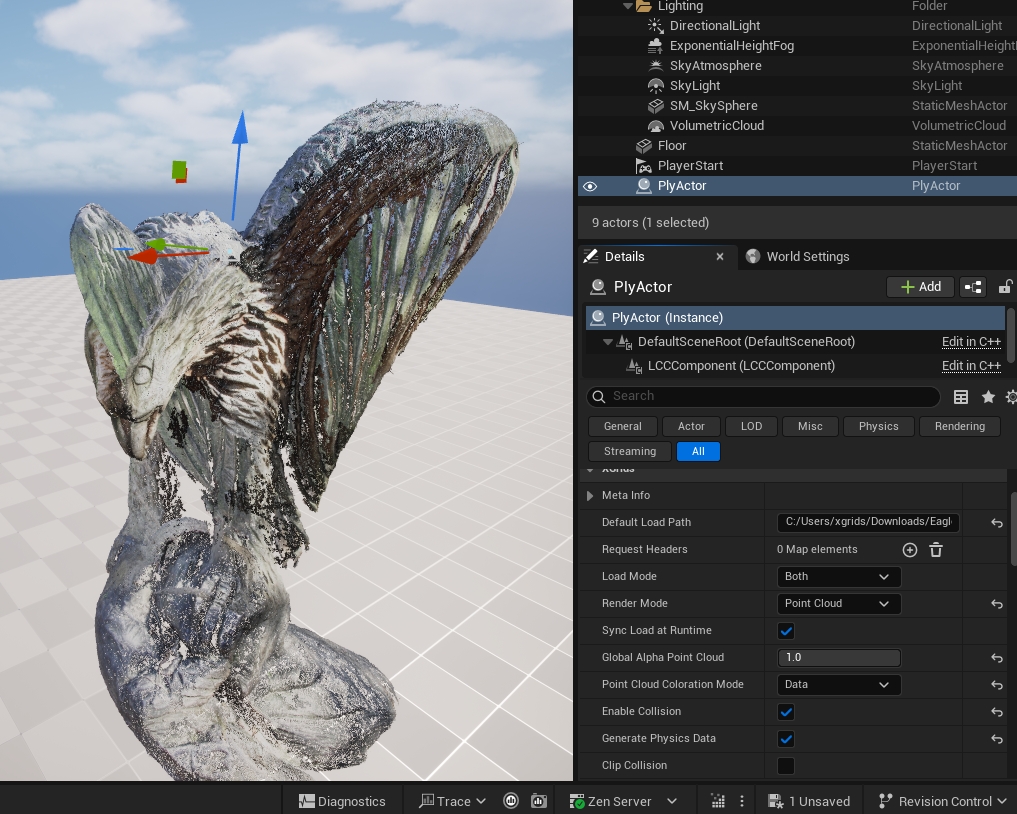
After a point cloud PLY is loaded, each point is displayed as a small dot
PLY also has no LOD and no chunking, so converting large scenes to the LCC2 format is recommended.
Is Android packaging supported?
The current version does not support packaging directly to the Android platform. To use it on a VR device, run on PC and stream, see Quick Start - Quest3.
Is orthographic view supported?
Yes. Both the 3DGS and point cloud render modes display correctly in orthographic view, and all five formats (.lcc, .lcc2, .sog, .spz, .ply) behave the same. No settings need to be changed when switching to an orthographic view; the plugin detects the camera projection mode automatically.
For floor plans, elevations, top-down views and other images that need no perspective, simply switch the viewport or camera to orthographic.
Can a mirror material reflect 3DGS?
No. When a reflection is needed (a rear-view mirror, for example), use the SceneCapture2D component of the engine to capture the image instead.
Can it be rendered together with regular Mesh models?
Yes. The typical approach is to cut away the part of the 3DGS to be replaced with the clipping tools, then place the reworked Mesh into the clipped area; the plugin handles depth and occlusion automatically.
Set the Mesh material to Opaque; translucent materials can produce depth sorting issues. Extend the clipping edge slightly beyond the Mesh bounds.
Can I get the latitude and longitude of a point on the 3DGS?
The plugin does not provide a coordinate conversion interface directly, but the calculation can be done manually. The .lcc2 description file contains epsg and offset information, which can be converted together with GetRTKBaseLocation and the conversion methods of the geographic reference system.
Can annotations made in LCC Studio be shown in the plugin?
No. Annotations are saved in the attrs.lcp file, which the plugin does not parse, so the application layer has to read and render it.
Can the skybox configured in LCC Scene Editor be brought into UE?
No. Two easily confused concepts need to be separated here, because the "sky" seen in an LCC scene actually comes from two different places:
| Environment Data | Skybox | |
|---|---|---|
| What it is | The scene environment background generated automatically during reconstruction, including the distant sky and distant views. Essentially 3DGS Gaussians marked as "environment" | The background effect replaced through a preset template in LCC Scene Editor |
| Part of the data itself | Yes, stored along with the LCC data | No, only an overlay display feature of the Editor |
| Supported by the plugin | Rendering supported | Not supported, not carried over with the data |
In other words, the plugin can render the reconstructed environment background, but the skybox template swapped in the Editor does not come along.
For sky effects in UE, use the engine solutions such as Sky Atmosphere, SkyLight, or a custom skybox material. To view only the environment data, confirm LoadMode is Both (the default value); setting it to OnlyMain hides the environment part, see Load Mode.
Are C++ calls supported?
Yes. Add the LCC4UnrealRuntime module dependency in build.cs.
Is collision supported?
.lcc and .lcc2 are supported and the data must ship a collision file; .sog, .spz, and .ply contain no collision data and have to be built manually with Blocking Volumes or an approximate mesh. See Collision.
Is nDisplay supported?
Yes. With ALCCActor (LCC pipeline), set Default Traversal Type to Circle and restart the editor; the LCC2 pipeline can stay on the default. See Third-party and Engine Plugin Integration.
Is VR supported?
Stereo rendering (InstanceStereo) is supported.
How many clipping volumes / section planes can actually be placed?
| License | Effective count |
|---|---|
| Free edition | 50 of each type |
| Pro edition | 65536 of each type |
The two types are counted independently and do not consume each other's quota. For licensing, see Editions and Licensing.
What do I do about a specific failure?
This page only answers consultation questions. When a specific symptom already occurs (nothing displayed, flickering, low frame rate, packaging errors), see Troubleshooting and locate it by symptom.
To view logs and use the debug tools, see Logging and Diagnostics.
Any other questions?
See Contact Us for help through the technical support email, the developer platform, or the Discord community.