
Settings
Open the Settings panel to manage various editor configurations.
Entry: Menu bar → File → Settings
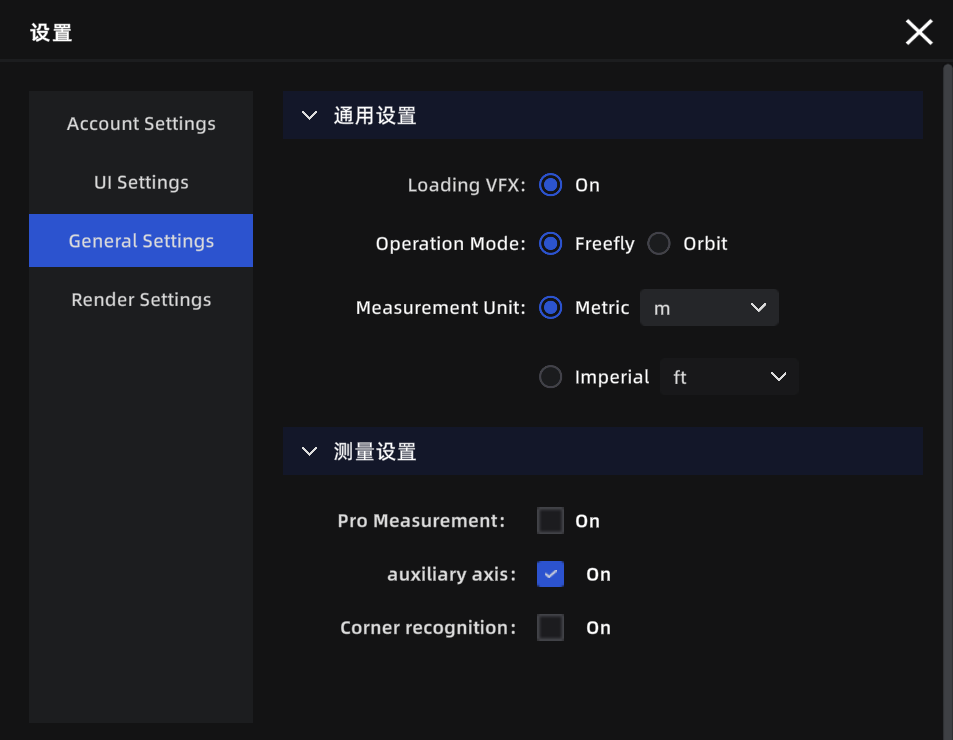
Settings panel
Account Settings
| Setting | Description |
|---|---|
| User Info | View the currently logged-in account name and avatar |
| User Agreement | View user agreement content |
| Privacy Policy | View privacy policy content |
| LCC Improvement Program | Choose whether to participate in the product experience improvement program |
| Sign Out | Sign out of the current account |
UI Settings
| Setting | Description |
|---|---|
| Language | Switch the interface display language (Chinese/English/Japanese/Traditional Chinese/Italian/German/Spanish) |
| Show Grid | Display a reference grid at the bottom of the 3D view to help judge model position and scale |
| Grid Opacity | Adjust grid transparency. 0% is fully transparent, 100% is fully opaque |
General Settings
| Setting | Description | Default |
|---|---|---|
| Default Operation Mode | The default view navigation mode used each time a project is opened | Roaming |
| Measurement Unit System | Switch the display unit for measurement data (Metric/Imperial) | Metric |
| Metric Unit | Select the metric length unit (Meter/Centimeter) | Meter |
| Imperial Unit | Select the imperial length unit (Feet/Inch) | Feet |
| Professional Measurement | When enabled, measurement results additionally display X/Y/Z component values | Off |
| Auxiliary Axis | When measuring, automatically snaps to X/Y/Z axis directions for precise horizontal or vertical measurements | Off |
| Corner Detection | Automatically detects model edges and corners during measurement for improved point-selection accuracy | Off |
Note: Auxiliary Axis and Corner Detection can also be toggled in real-time during measurement using the
Ctrl/Tabshortcut keys.
Render Settings
| Setting | Description | Default |
|---|---|---|
| Render Quality | Adjust image quality. Higher quality produces clearer visuals but requires more hardware performance | Auto-recommended based on hardware |
| Graphics API | If screen tearing or flickering occurs, try switching this option | Direct12 |
Note: All settings above are global configurations that apply across all projects.