XGRIDSDocs
  • 简体中文
  • English
  • 繁體中文
  • 日本語
  • Deutsch
  • Español
  • Italiano
  • 简体中文
  • English
  • 繁體中文
  • 日本語
  • Deutsch
  • Español
  • Italiano
  • Lixel CyberColor

    • LCC Studio

      • Getting Started
      • Version and Updates
      • Download and Installation
      • Interface Overview and Navigation
      • Pre-Reconstruction Work
      • Model Reconstruction
      • Single Model Reconstruction
      • Map Fusion
      • Aerial-Ground Map Fusion
      • Aerial Reconstruction
      • My Models
      • Other Features
      • Settings and Account
      • Video Reconstruction
    • LCC Scene Editor

      • Version and Updates
      • Account and Sign-In
      • Product Overview and Home
      • Editor Interface
      • Navigation Modes
      • File
      • Settings
      • Edit
      • Window
      • Global Toolbar
      • Assets and Properties
      • Left Toolbar
      • Viewpoint
      • Skybox
      • Annotation
      • Measure
      • Flythrough
      • Scene Report
      • 3D Layout
      • Preview Mode (Viewer)
      • Help
      • FAQ
    • LCC Model Editor

      • Overview and Interface
      • File Operations
      • Selectors
      • Editing Models
      • Measurement
      • Color Grading
      • Asset Management
      • Settings and Help
    • Version History

Skybox

The Skybox tool quickly replaces the scene background and uses preset templates for different times of day and weather.
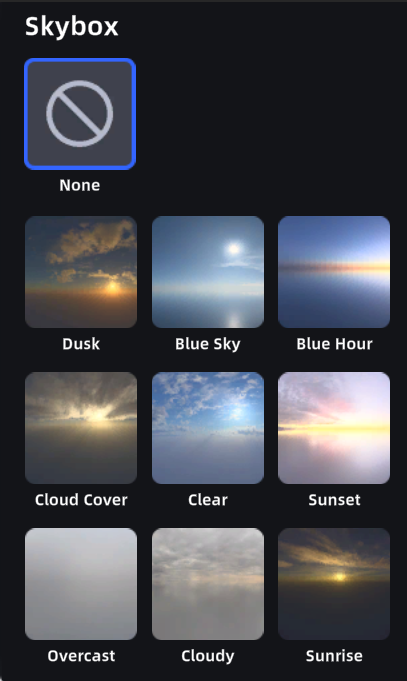
Skybox

Preset skyboxes

Usage

  1. Click Skybox to open the skybox settings panel.
  2. The panel shows preset templates. Preview and apply directly.

Note: Skybox conflicts with environment data. Enabling Skybox disables environment data automatically.

Prev
Viewpoint
Next
Annotation